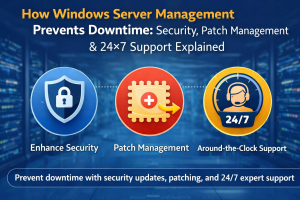
Windows Server Management for hosting providers includes continuous monitoring, security hardening, patch management, and 24×7 support strategies to prevent downtime and maintain high-performance infrastructure. In real-world hosting environments, engineers do not just manage servers; instead, they proactively secure systems, apply updates, monitor logs, and resolve issues before they impact users. As a result, effective Windows server management ensures uptime above 99.9%, protects against cyber threats, and optimizes performance across enterprise and hosting platforms.
Quick Summary:
Windows server management involves security hardening, patch management, monitoring, and incident response to ensure uptime and performance. Engineers use tools like Event Viewer, PowerShell, and performance monitoring utilities to detect issues early. Hosting providers rely on Windows server management services, cloud server management services, and 24/7 technical support outsourcing to prevent downtime, secure infrastructure, and maintain scalable operations.
Why Windows Server Management Is Critical for Hosting Providers
Hosting providers rely heavily on Windows servers to run enterprise applications, ASP.NET websites, MSSQL databases, and virtualization environments. However, many assume that once a server is deployed, it will perform consistently without intervention. In reality, infrastructure engineers consistently observe performance degradation due to unpatched systems, security vulnerabilities, and resource mismanagement.
In simple terms, Windows server management ensures that servers remain secure, updated, and optimized under varying workloads. Without proper server monitoring and maintenance, small issues such as memory leaks or failed services gradually escalate into downtime incidents. Therefore, hosting providers must adopt proactive strategies rather than reactive troubleshooting.
Understanding Windows Server Management in Real Environments
Windows server management involves handling multiple layers, including operating system configuration, application services, network settings, and security policies. Engineers working in Windows server management services and system administration services continuously monitor system health and optimize performance.
For example, in production environments, engineers frequently analyze system performance using:
Get-Process | Sort-Object CPU -Descending
Get-Service
Get-EventLog -LogName System -Newest 50
These commands help identify high CPU processes, failed services, and system-level errors. As a result, engineers can take corrective actions before performance issues impact users.
Security remains one of the most critical aspects of server management. Hosting providers face constant threats, including brute force attacks, ransomware, and unauthorized access attempts. Therefore, engineers implement server hardening and security management strategies to protect infrastructure.
In real-world scenarios, engineers configure:
- Windows Firewall rules
- Remote Desktop access restrictions
- Group Policy security settings
- Antivirus and endpoint protection
For example, disabling unnecessary services reduces the attack surface. Additionally, engineers monitor security logs using Event Viewer:
Get-WinEvent -LogName Security | Select-Object -First 20
In many cases, unprotected servers become entry points for attackers. However, with proper hardening, engineers significantly reduce security risks and maintain compliance.
Patch Management: Why It Is Non-Negotiable
Patch management plays a crucial role in maintaining system security and stability. However, many hosting providers delay updates due to fear of downtime. In reality, this approach creates long-term risks.
From our experience in server patch management services, most critical vulnerabilities occur due to outdated systems. Engineers use Windows Update services and automated patching tools to apply updates in controlled environments.
For example, using PowerShell:
Install-WindowsUpdate -AcceptAll -AutoReboot
In addition, engineers test patches in staging environments before applying them to production servers. As a result, they ensure stability while maintaining security.
24×7 Monitoring and Incident Response
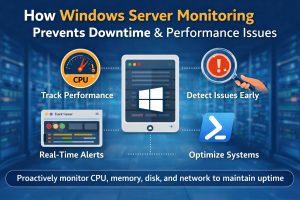
Continuous monitoring forms the backbone of proactive server monitoring services. Hosting providers cannot rely on manual checks, especially when managing hundreds of servers.
In real environments, engineers use monitoring tools such as:
- Windows Performance Monitor
- Event Viewer
- Third-party monitoring platforms
These tools track metrics such as CPU usage, memory consumption, disk I/O, and network performance. When anomalies occur, alert systems notify engineers immediately.
For example, if CPU usage exceeds 90%, engineers analyze processes, identify root causes, and optimize workloads. As a result, they prevent downtime and maintain consistent performance.
Common Problems in Windows Server Environments
Problem 1: High CPU Usage
High CPU usage often occurs due to inefficient applications or background services. Engineers identify processes using:
Get-Process | Sort CPU -Descending
Fix: Optimize applications, restart services, or scale resources.
Problem 2: Memory Leaks
Applications consuming excessive memory can degrade performance.
Fix: Engineers analyze memory usage and restart affected services or update applications.
Problem 3: Service Failures
Critical services may stop unexpectedly.
Fix: Engineers configure automatic service recovery and monitor logs.
Problem 4: Security Breaches
Unpatched servers become vulnerable to attacks.
Fix: Apply patches, enable firewalls, and monitor security logs.
Cloud Integration and Multi-Environment Management
Modern hosting providers operate in hybrid environments, combining on-premise servers with cloud platforms. Therefore, cloud server management services play a key role in scaling infrastructure.
Engineers integrate Windows servers with:
- AWS server management support
- Azure cloud support services
- Google Cloud server support
In cloud environments, auto-scaling ensures resources adjust dynamically based on traffic. As a result, hosting providers maintain performance without over-provisioning resources.
Outsourced Technical Support and NOC Operations
Many hosting providers rely on outsourced infrastructure support teams to manage operations efficiently. Instead of maintaining large in-house teams, they partner with outsourced web hosting support companies and white label technical support services.
These teams provide:
- 24/7 monitoring
- Incident response
- Help desk support
In simple terms, outsourcing ensures continuous coverage and reduces operational costs. Furthermore, it allows hosting providers to focus on business growth while experts handle infrastructure.
Real-World Use Case: High-Traffic Hosting Environment
In one production environment managing enterprise applications, engineers observed frequent slowdowns during peak hours.
Problem: High CPU and memory usage
Cause: Inefficient application processes and lack of resource optimization
Fix:
- Optimized application configurations
- Implemented resource monitoring
- Scaled infrastructure
Result: Performance improved by 50%, and downtime incidents reduced significantly.
This scenario demonstrates how server performance optimization services directly impact business reliability.
Engineers follow structured practices to maintain stability and scalability. They continuously monitor logs, apply updates, optimize configurations, and implement security measures. In addition, they automate processes such as backups and monitoring to reduce manual intervention.
Furthermore, centralized monitoring tools provide visibility across infrastructure, enabling engineers to detect issues quickly. As a result, systems remain stable, secure, and scalable under varying workloads.
Struggling with Traffic Spikes and Downtime?
Partner with our experts for reliable cloud auto-scaling, proactive monitoring, and high-availability infrastructure solutions.
Talk to a Specialist
FAQ: Windows Server Monitoring, Downtime & Technical Support
How does Windows server monitoring work?
Windows server monitoring tracks CPU, memory, disk, and network performance using tools like Performance Monitor and Event Viewer. In addition, alert systems notify engineers when anomalies occur.
What causes Windows server downtime?
Windows server downtime occurs due to resource exhaustion, misconfiguration, security vulnerabilities, or hardware failure. In many cases, these issues develop gradually.
How do engineers troubleshoot Windows server performance issues?
Engineers analyze logs, monitor system metrics, and use PowerShell commands to identify bottlenecks and optimize configurations.
Why do hosting companies outsource technical support?
Hosting companies outsource support to ensure 24/7 monitoring, faster issue resolution, and cost efficiency through expert teams.
Conclusion
Windows server management is not just about maintaining systems; it is about ensuring security, performance, and reliability across hosting environments. By implementing proactive monitoring, regular patch management, and robust security measures, engineers prevent downtime and maintain high uptime.
In today’s infrastructure landscape, hosting providers must adopt advanced management strategies and leverage managed cloud infrastructure support services to remain competitive. Ultimately, effective Windows server management ensures seamless operations, improved performance, and long-term business success.